
Introduction
Getting started with Serpclix is not overly difficult, but the initial setup can feel a little confusing the first time through the process. The same can be said when updates are made available. That is why I created this Serpclix setup guide.
I have created this guide to minimise any friction that may arise when setting up for the first time, or performing the updates.
I have been using Serpclix since early 2023, and it has consistently provided monthly payments to my PayPal account in USD. Because of that, I am comfortable recommending it as a genuine micro-earnings site – with one important clarification:
This is not a get-rich-quick platform.
It is a micro-earnings site, which means the earnings are small, gradual, and depend on what tasks or earning options are available to you. If you go in with realistic expectations, it can be a useful little side earner.
This guide is designed to help new users get through the setup processes more easily, especially the parts that may not be obvious the first time around.
Before You Start
Before creating your account, it is worth having a few things ready.
You will need:
- a valid email address
- access to PayPal
- a desktop or laptop browser – Microsoft Edge is the recommendation, especially due to the extension that needs to also be installed later. I will cover that too.
- a little patience during the first setup
- time to read each step carefully
This particular platform will work only with a desktop/laptop setup. Mobile browsers are not supported.
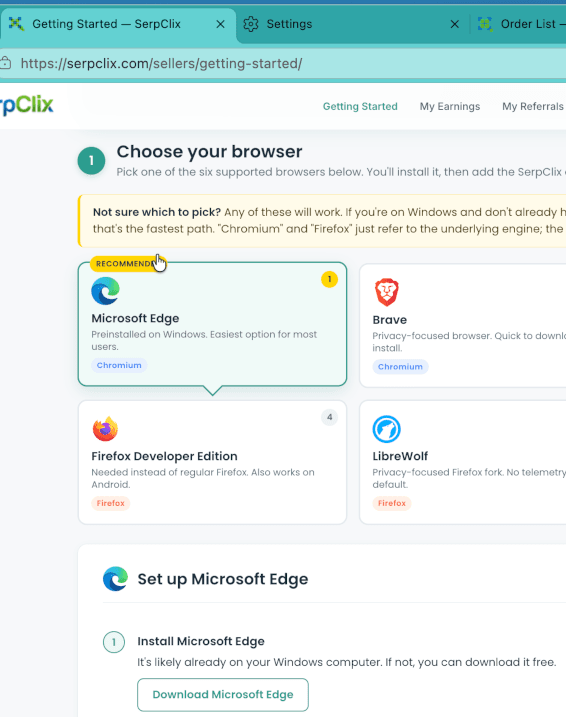
As this guide uses Edge in the example, the recommendation is that you follow along using that browser.
Once you have installed Edge, open this blog post in it to make the guide easier to follow along with.
You can use this link (right-click->copy link or copy link address) and paste it into the Edge URL address bar.
Step 1: Open the Sign-Up Page
To begin, visit the Serpclix sign-up page here:
You will want to SIGN UP AS A CLICKER
This link will open in a new tab.
This is a referral link. If you sign up through it, I may receive a small benefit at no extra cost to you. I only recommend this site because I have personally used it since early 2023 and it has continued to pay me.
Once the sign-up page opens, click on the ‘SIGN UP AS A CLICKER’ button.

Step 2: Create Your Account
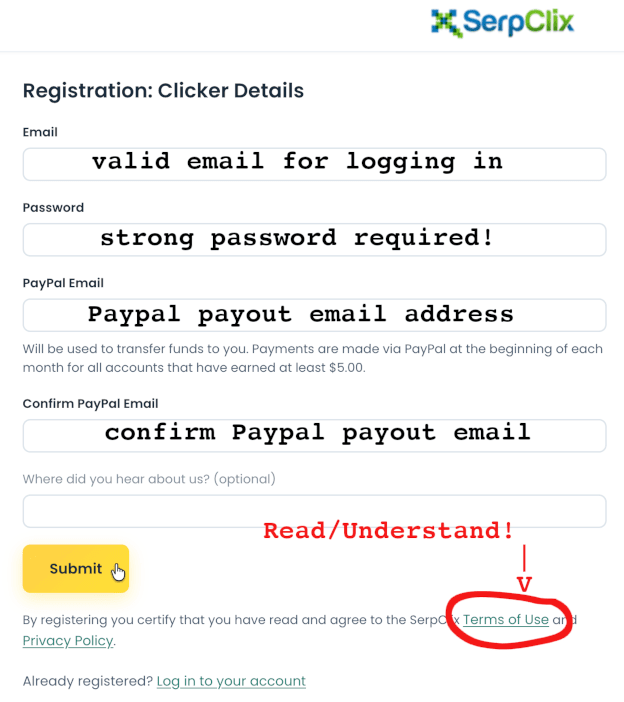
Enter the required details, such as your email address, password, and your Paypal email address. If you do not yet have Paypal, sign up for an account at Paypal.com
Make sure you use an email address you can actually access, because you may need to confirm your account before you can continue.
After entering your details, submit the registration form.
Tip:
Use a strong password and store it somewhere safe. You do not want to lose access to an account that may later hold earnings or payment details. On a similar note, you want to keep it secure to prevent unauthorised access.
Step 3: Confirm Your Email Address
After signing up, check your email inbox for a confirmation message from Serpclix.
You may need to click a confirmation link before your account becomes fully active.
Also check your spam or junk folder if the email does not arrive within a few minutes.
Once confirmed, return to Serpclix and log in.
Step 4: Log In to Your Dashboard
After confirming your email, log in to your account.
You should now arrive at your main dashboard. This is where you will find your earning options, account settings, profile details, payment settings, and progress information – all under their convenient sections.
Do not worry if the dashboard feels a bit busy at first. Most micro-earning platforms have a few different sections, and it may take a little time to understand what each one does.
Step 5: Complete Your Profile
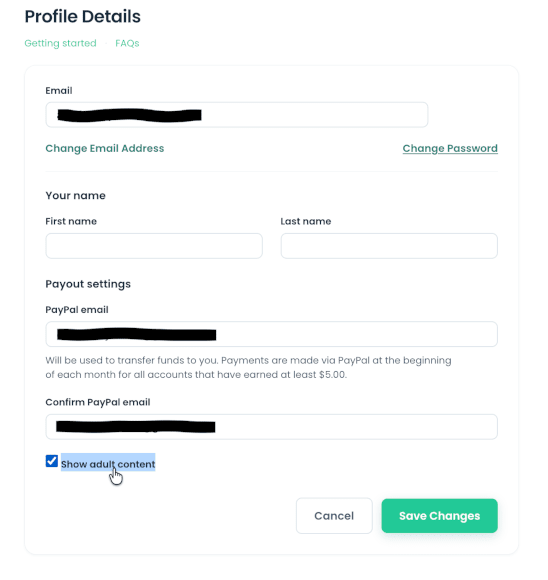
One of the most important early steps is completing your profile, and confirming that everything is correct.
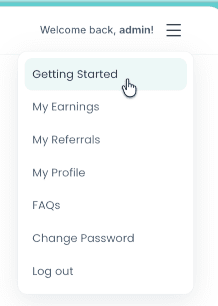
Use the Hamburger menu on the top right of the window, and select My Profile.
Check that everything is correct, and if you wish, also select the ‘Show adult content” checkbox.
Obviously you will need to ensure that you are the age of majority for this one, but to date, there has been very minimal porn. The majority of ‘adult’ searches are for gambling related searches.
Do not try to ‘game’ the system by entering false information. That can lead to poor task matches, rejected earnings, or account issues later.
Step 6: Download and install the Extension Interface
Serpclix uses an extension to allow the user to interact with the earning platform.
This extension needs to be downloaded, unzipped, and added into Edge to work.
At the time of writing, the extension version is v4.0.3.
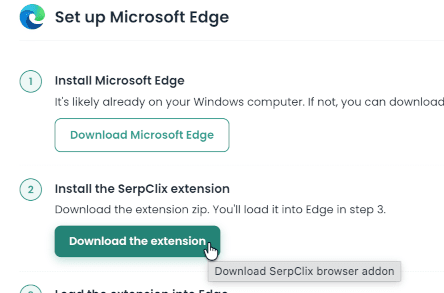
You can access the extension download link by either navigating to the ‘Getting Started’ section.
This can be done either via the Hamburger menu, or the top navbar.
Click on the button ‘Download the extension’.
It will not take long to download. Make sure you save the ZIP file somewhere easily accessible such as your Downloads folder, or similar.
Once it has downloaded, the next step is to extract the files. Ensure they remain in the folder once extraction completes.
Now we can load the extension into Edge.
This is completed as follows:
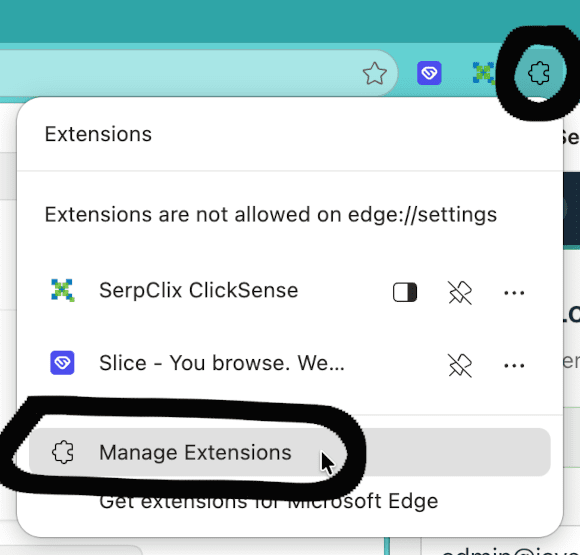
- Open the Extensions window. It can be accessed via the jigsaw puzzle icon, located to the right of the address bar. Then select ‘Manage Extensions’.
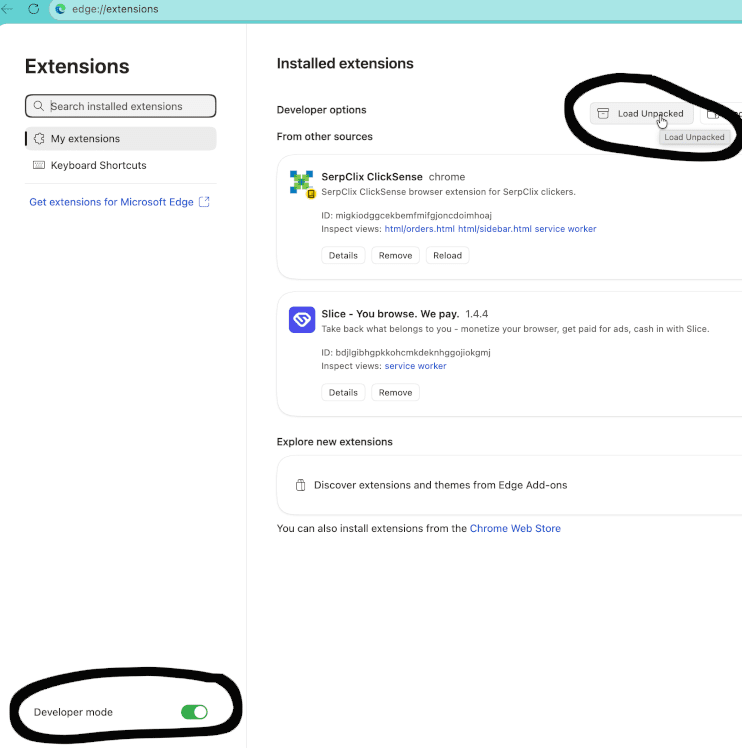
- Enable Developer Mode by using the toggle at the bottom left. This step is essential as it will allow adding the Serpclix extension to Edge.
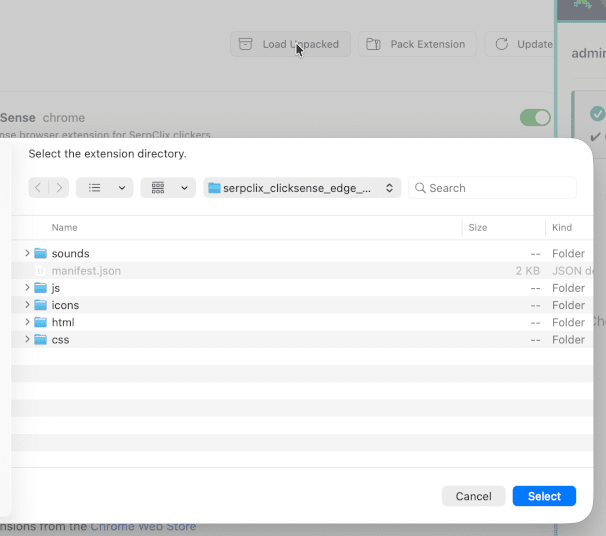
- Click the ‘Load Unpacked’ button.
Navigate to the location where you unpacked the ZIP file, and open the folder that it unpacked into.
You should see a number of folders, and also a file called ‘manifest.json’.
Click the ‘Select’ button. - The extension will successfully install. Once complete you can close the Extensions window.
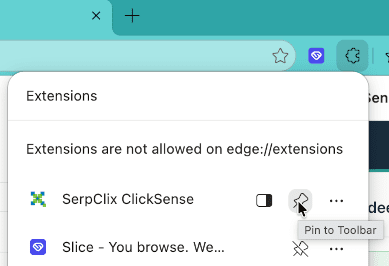
Although it is installed, it is not conveniently accessible. Fix this by clicking the puzzle piece icon again, and then click on the Pin beside the extension name. - Now you can click on the newly visible icon and sign into the extension using the same credentials you chose when signing up to Serpclix.
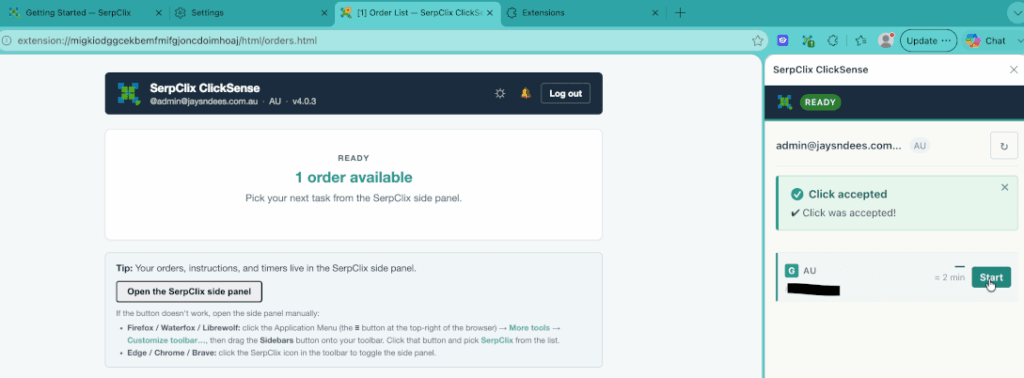
Recently with the Version 4 upgrade, the way the extension looks is different to what is shown in the Getting Started section.
The process is the same, but how it is displayed is different.
First, the extension is now a side window within the main Edge browser. This makes accessing your tasks a little easier.
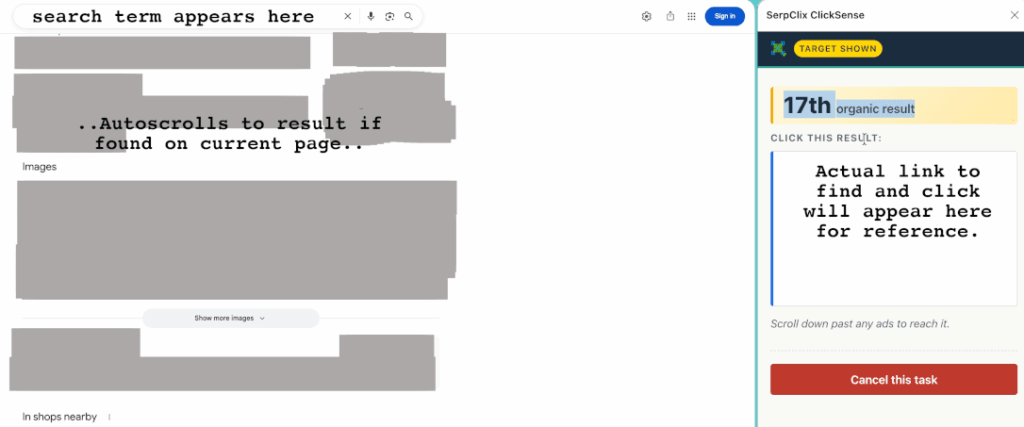
Second, the click task no longer gets highlighted when the match is found. Instead, you are given a visual results representation to look for in the search results.
Third, the extension seems to auto-logout after a period of inactivity. Check it regularly to ensure that you keep up with the tasks – they do not stay around all day, so you can not just ‘log in once a day’ and expect to be able to make anything.
Updating the Extension
From time-to-time, extension updates may become available. These will usually be bug fixes.
Updating the extension is usually done by:
- Download the latest extension version and unzip it to a convenient location.
- Click the jigsaw puzzle piece ->Manage Extensions
- Click on the ‘Remove’ button for the Serpclix extension
- Click on the ‘Load Unpacked’ button, and navigate to the new extracted folder location. Click the ‘Select’ button.
- Remember to ‘Pin’ it for ease of access.
- Login to the new extension interface using your credentials.
- Enjoy as before.
Step 7: Your Earnings
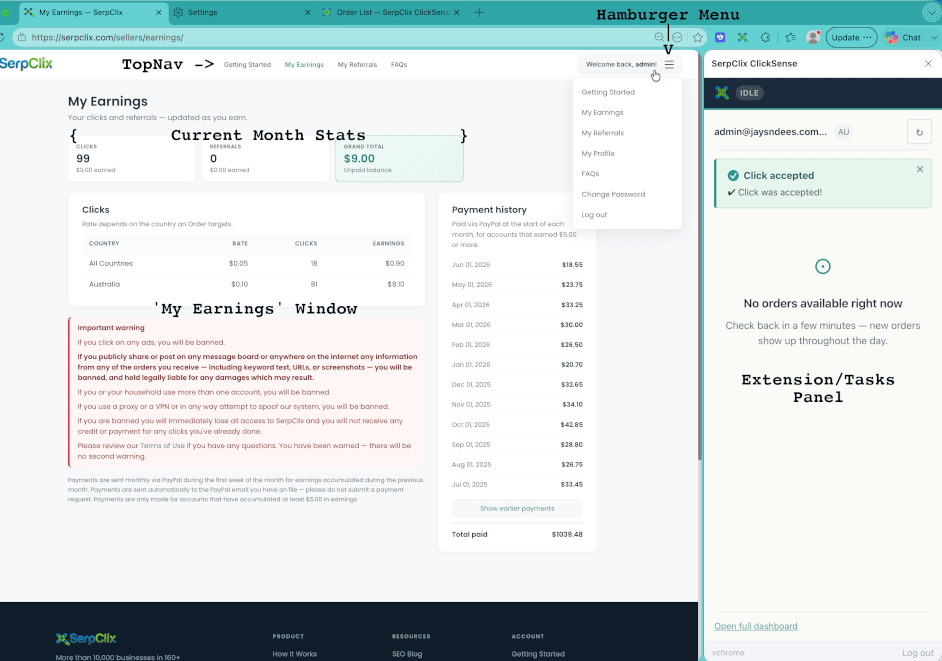
Your earnings are automatically paid to your Paypal account within the first week of each month, provided you have reached the minimum threshold. If you haven’t quite made it, do not worry – your total will roll-over towards the next month of earnings.
You do not need to request payouts or anything like that – it is all done automatically.
You can easily access your current earnings by using the Hamburger menu, or the topnav bar, and selecting ‘My Earnings’.
Suggested screenshot:Screenshot 7: Earning options area or task menu.
Step 8: Understand the Minimum Payout
As previously mentioned, payouts are automatic – as long as you have reached a minimum $5 during the month. Payouts are made in USD.
If you do not reach the minimum for the month, they simply roll-over into the net month.
Step 9: How Do The Tasks Work?
Tasks are very easy to perform.
You are notified when there is new Task/s available.
You simply click on one via the extension, paste the result into the search engine that appears (if not a direct link), and find it on the results pages.
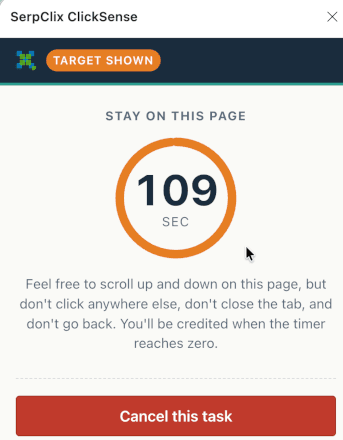
When found, you click it, and then wait for the timer to countdown. You can view the resulting page, or carry on with doing whatever else you were doing.
DO NOT close the browser OR the window that opened – you will not be credited if you do!
Once the timer reached Zero, the window will automatically close, at which point you will be credited for your effort.
There is a 30 second ‘cooldown time’ between allowable clicks. This keeps the search engines happy.
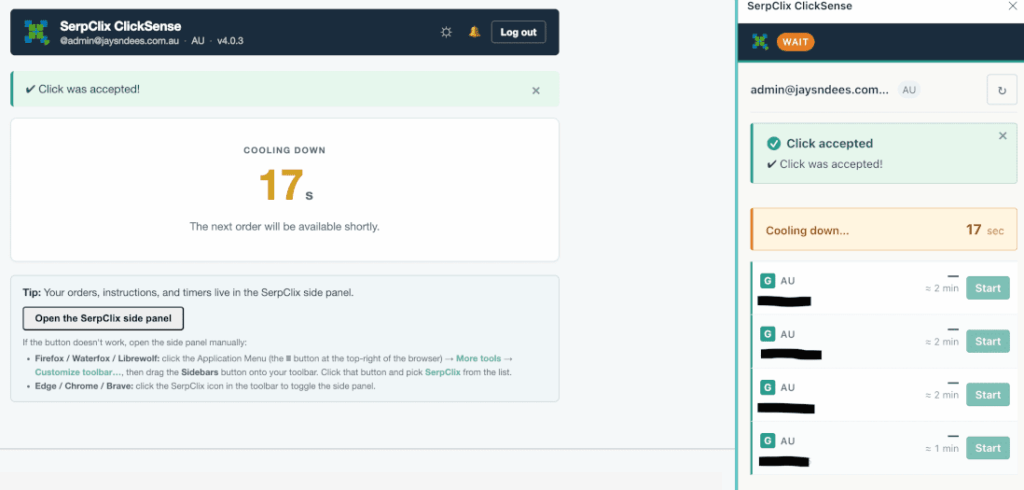
Complete all your tasks – more get added throughout the day so ensure you check regularly!
My highest monthly total was $54.15.
Step 10: Keep Expectations Realistic
This is probably the most important part of the whole guide.
Serpclix is a micro-earnings PTC site. That means it is designed for small amounts of extra money, not a full-time income.
I personally view it as a small side earner. It has been reliable for me, and the monthly PayPal payments are the reason I still use it, but I would never describe it as life-changing money.
I admit, I get a little bit excited at the end of each month. Especially if USD to AUD is on the more favourable side of $1.50+. But I am still happy with the results each month – as long as they stay above 1:1.
The best way to approach it is:
small tasks, small earnings, steady progress.
If you expect it to replace a wage, you will probably be disappointed. If you treat it as a small extra earner, it makes much more sense.
Common Beginner Mistakes to Avoid
Rushing through the setup
It is better to spend a few extra minutes getting your profile and payment details right, and reading through the Terms of Service than to run into problems later.
Using the wrong PayPal email
Double-check your PayPal email before a payment is sent.
Expecting large earnings immediately
This is micro-earning. The amounts are small, but they are consistant.
Ignoring payout rules
Always check the minimum payout, and the accompanying conditions.
Minimum payout is $5, and is paid within the first few days of the new month for previous month earnings.
Trying too many tasks at once
You can only complete a single task at a time.
Giving false profile information
Be honest with your profile details. Incorrect information can cause issues with task matching or account reliability.
Is Serpclix Worth Using?
For me, yes – but with realistic expectations.
I have used Serpclix since early 2023, and it has continued to provide monthly PayPal payments. That consistency is the main reason I am comfortable writing about it.
However, I would not recommend it to someone expecting quick or large earnings.
It is better suited to people who understand micro-earning sites and are happy to build up small amounts over time.
Final Thoughts
The initial setup for Serpclix can be a little tricky, but once the account is created, confirmed, and linked to PayPal, it becomes much easier to understand.
My advice is to take your time, follow the steps carefully, and treat the site as a small side earner rather than a major income source.
You can sign up here:
Sign up to Serpclix and become a clicker too!
And once again, keep expectations realistic. This is not a get-rich-quick scheme. It is simply a micro-earnings site that, in my own experience, has continued to pay reliably since early 2023.