
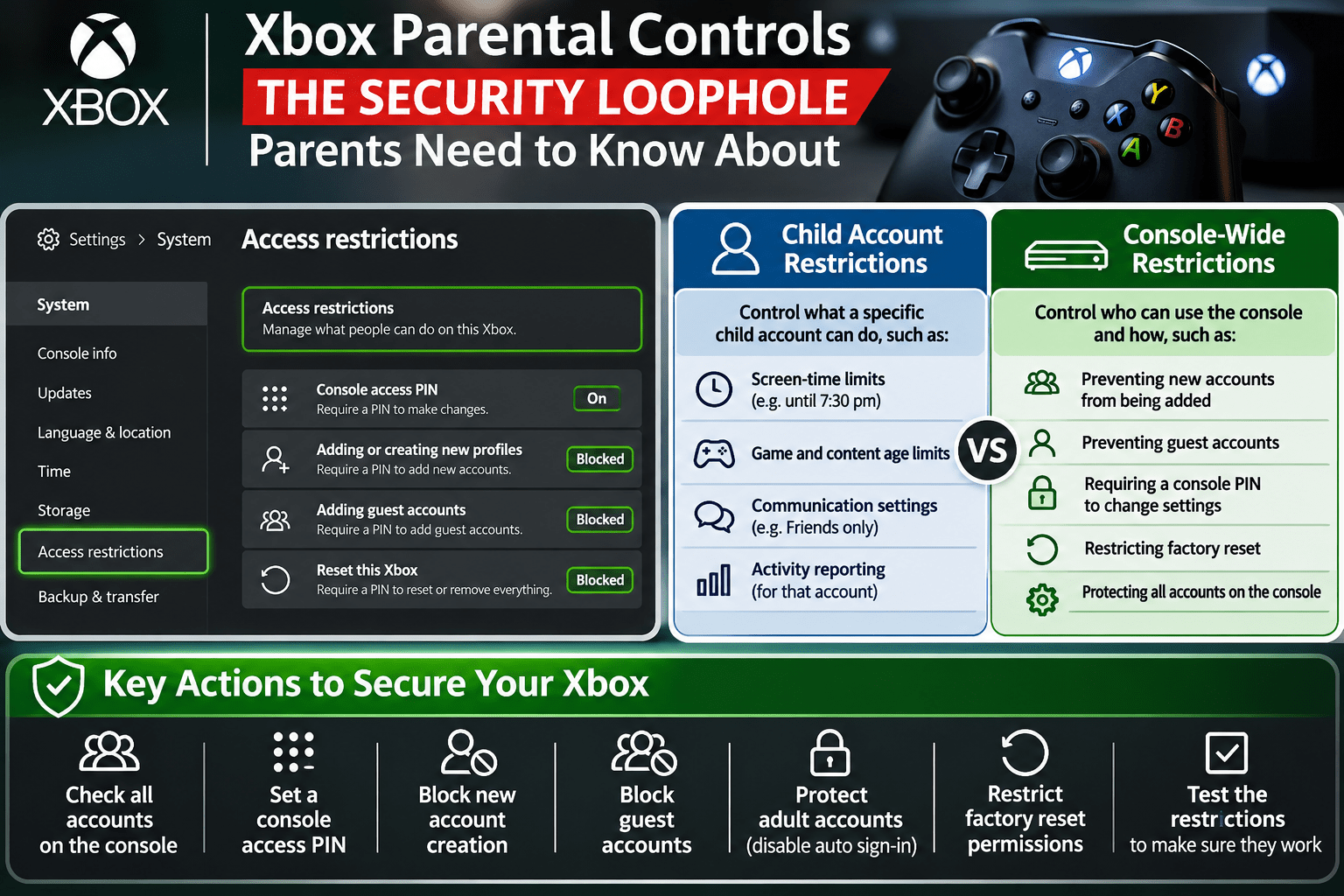
Your child’s Xbox may have parental controls enabled, strict screen-time limits and communication restrictions.
You know they do as you went and set it all up yourself, spending maybe a couple of hours in thought and action.
But are you certain those protections apply to everyone who can use the console?
That is a question every parent with an Xbox should be asking.
We recently discovered a concerning weakness in the way our son’s Xbox One was configured. Despite having a managed child account, established screen-time restrictions and parental supervision, an entirely separate Microsoft account was present on the console.
That account was unrestricted, could automatically sign in and had access to Xbox Party Chat.
It wasn’t included in our Microsoft family group.
Consequently, the restrictions we had carefully configured for our child’s legitimate account did not govern this additional account.
The discovery raised an uncomfortable question:
How many parents believe their child’s Xbox is safely restricted, without realising that another account on the same console may bypass those protections?
The discovery that prompted our investigation
Our household has established rules surrounding gaming, online communication and permitted device usage.
The Xbox One was configured with a managed child account and a daily permitted usage window ending at 7:30 pm.
We had no reason to believe those restrictions were not operating as intended.
However, concerns about possible online communication late at night prompted us to investigate.
We first examined Microsoft’s Xbox Family Settings app and the associated activity reports.
The reports showed no recorded Xbox One activity for the day in question.
That might ordinarily suggest the console hadn’t been used.
But there was another possibility: what if activity was occurring through an account that wasn’t being monitored?
We decided to examine the Xbox itself.
What we discovered was alarming.
An unrestricted account hiding in plain sight
The Xbox contained three profiles:
- The legitimate, parent-managed child account.
- A parent’s Microsoft account.
- An additional Microsoft account that was not part of our family group.
The additional account had several concerning characteristics.
It was configured for automatic sign-in.
When the Xbox was turned on, it signed directly into this account without requesting a password or PIN.
It had unrestricted content permissions.
The console displayed unrestricted access for the additional account, rather than the limitations associated with the managed child profile.
Xbox Party Chat was available.
This meant the account could access the console’s voice communication interface without launching a game.
It was absent from our Microsoft family group.
The parental controls we had established for the child’s legitimate account did not apply to this separate account.
We had discovered a potential route around our household’s existing restrictions.
Importantly, this does not prove that the additional account was used for any particular conversation. But its presence, automatic sign-in and unrestricted configuration demonstrated a serious gap in our console’s access controls.
Why this matters far beyond gaming
Parents sometimes think of Xbox parental controls primarily as a way to limit games, purchases or age-inappropriate content.
But modern gaming consoles are also communication devices.
Xbox Party Chat allows users to participate in voice conversations without playing a game. Xbox messaging provides another means of communication.
This creates a different category of risk.
A child who can access an unrestricted account may potentially communicate with others when their managed account would otherwise be unavailable.
The consequences can extend well beyond extra gaming time.
1. Unsupervised communication
A child may be able to participate in conversations outside the communication boundaries established by their parents.
Depending on the account’s settings and contacts, this could expose them to unwanted contact, bullying, harassment, manipulation or other inappropriate interactions.
An unrestricted account does not mean these things are happening. It means that safeguards designed to reduce such risks may not be operating as parents expect.
2. Bedtime and sleep disruption
A console with a scheduled cutoff is often part of a household’s bedtime routine.
If an alternative account remains accessible after that cutoff, late-night conversations can continue independently of the managed account’s schedule.
Repeated late-night activity can interfere with sleep, school readiness and general wellbeing.
3. Misleading parental activity reports
Microsoft Family Safety reports activity associated with managed accounts and devices.
Parents may reasonably look at a report showing zero usage and conclude that their child hasn’t been using the Xbox.
But activity through a separate, unmanaged account may not appear in the child’s report.
No recorded activity is not necessarily the same as no console activity.
Microsoft’s own troubleshooting documentation also acknowledges that activity reports can differ from actual usage under certain circumstances.
4. Exposure to age-inappropriate content
An unrestricted account may have access to content that would otherwise be limited under a child’s age-based settings.
This potentially undermines restrictions covering games, media and online interactions.
5. Loss of confidence in parental safeguards
Perhaps the most concerning consequence is the false sense of security that can arise.
Parents may believe they have completed the necessary setup because the child account is managed, screen-time limits are configured and the Family Settings app shows the expected restrictions.
But account-level restrictions alone do not necessarily secure the physical console.
That distinction is crucial.
The underlying weakness: Account restrictions versus console restrictions
This is the central issue.
Microsoft’s parental controls provide mechanisms for managing individual child accounts.
However, an Xbox can support multiple Microsoft accounts.
If the console permits an additional account to be added and used without appropriate authorisation, the restrictions on the original child account may become irrelevant to activity performed through that alternative account.
This is not necessarily a software exploit or a failure of the child account’s screen-time enforcement.
It is an access-control weakness that can arise when the console itself has not been secured.
Microsoft acknowledges the importance of protecting sign-ins and restricting access when users are signed out.
The problem is that parents may not realise these additional protections are necessary.
Securing the child account and securing the console are two separate tasks. Both matter.
How to check and secure your Xbox One
The following procedure reflects the settings available on the Xbox One we investigated. Menu names may differ depending on the console model and software version.
Step 1: Check every account on the console
Turn on the Xbox and open the account-switching menu.
Look for every profile installed on the console.
Identify which accounts belong to children, which belong to parents and whether any unfamiliar accounts are present.
Pay particular attention to accounts that automatically sign in when the Xbox starts.
Do not assume that every profile is covered by Microsoft Family Safety.
Step 2: Check Microsoft Family Settings
Install the Xbox Family Settings app or visit Microsoft’s Family Safety website.
Sign in using a parent or family organiser account.
Confirm that the child’s legitimate Xbox account is included in the family group.
Review the permitted hours, daily screen-time allowance, communication permissions and activity reporting.
Remember that restrictions applied to one account do not automatically govern every other account on the console.
Step 3: Open the console’s access restrictions
On the Xbox One we investigated, the relevant menu was located at:
Settings → System → Access restrictions
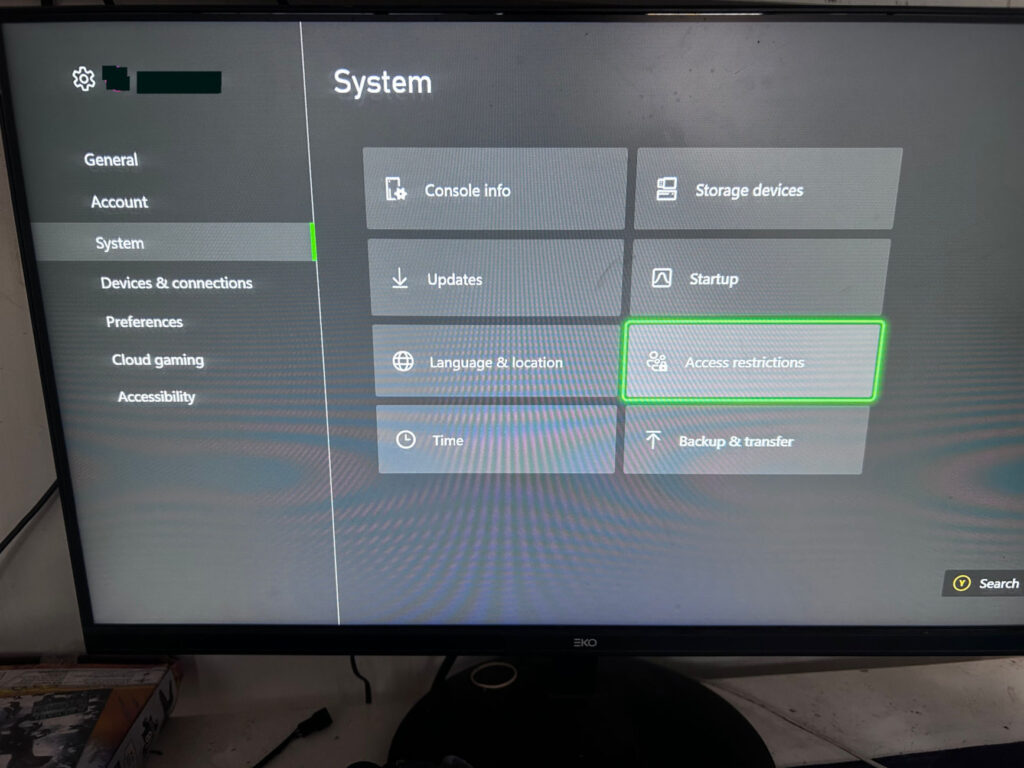
This is an important distinction because some online instructions refer to older menu names, including Signed-out content restrictions.
Look for the console access PIN and options governing account creation, guest access and other protected functions.
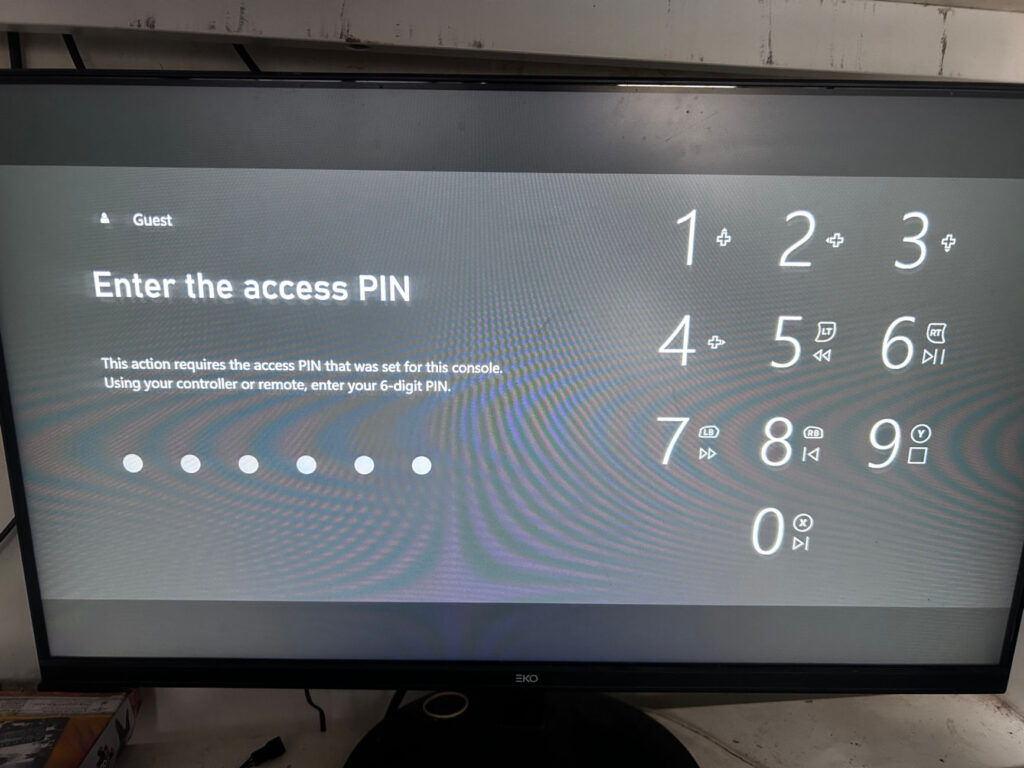
Step 4: Create a private console access PIN
Configure an access PIN known only to the responsible adults.
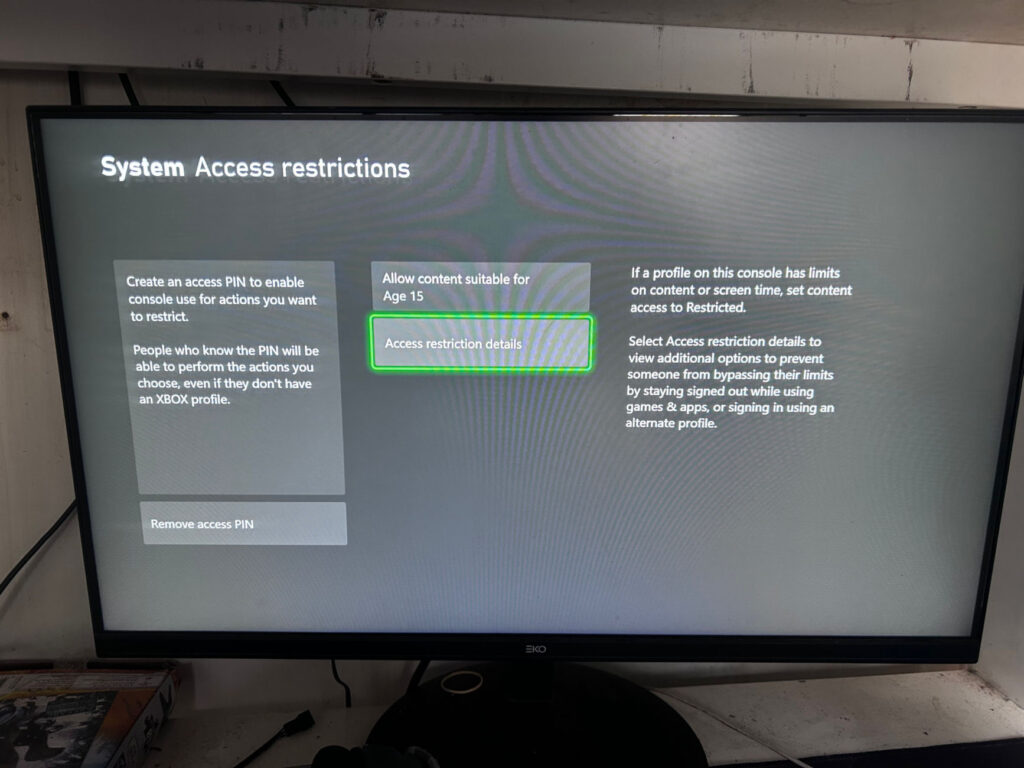
Avoid using a familiar birthday, easily guessed sequence or PIN already known to the child.
Verify that protected settings cannot be changed without entering the PIN.
Step 5: Restrict new accounts and guests
Disable unrestricted creation or addition of new profiles.
Also restrict guest account creation.
On our console, these functions could be configured to require the access PIN.
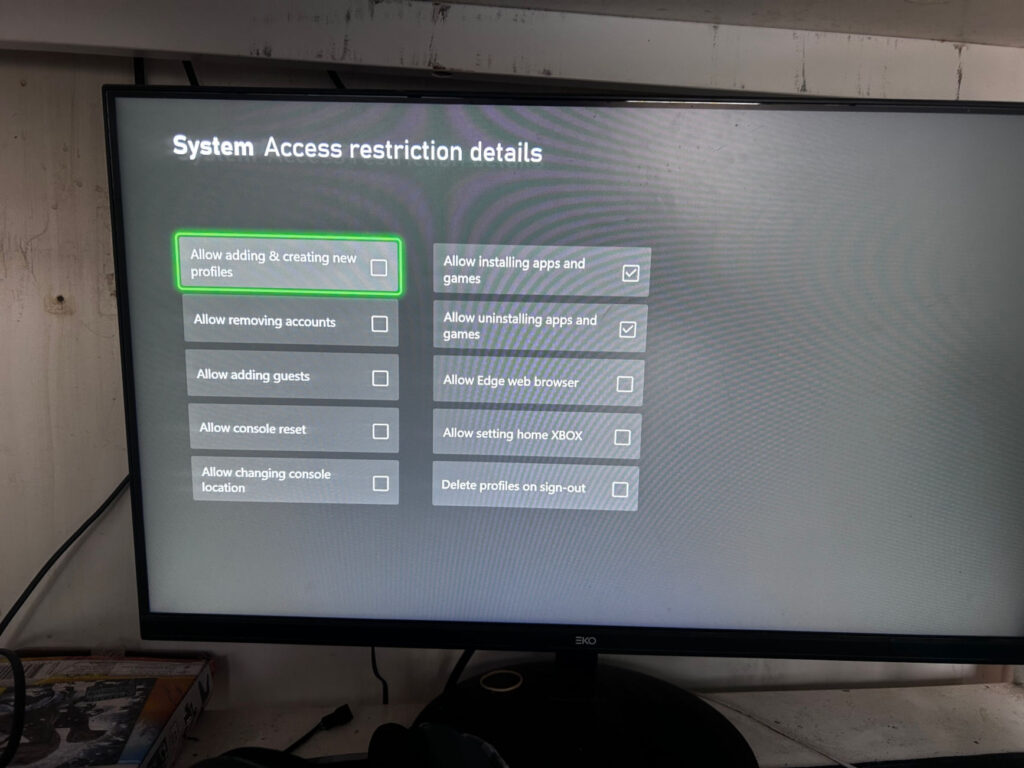
This is one of the most important protections because removing an unauthorised account achieves little if another can immediately be added.
Step 6: Protect adult accounts
Every adult account on the console should have appropriate sign-in protection.
Do not rely solely on the Microsoft account having multifactor authentication.
Check whether an existing Xbox profile can be opened without further authentication, and disable unwanted automatic sign-in.
A child should not be able to switch into an unrestricted adult account without authorisation.
Step 7: Restrict console reset functions
Where supported, protect factory reset and related console-management functions.
These safeguards help prevent locally configured restrictions from being casually removed.
Step 8: Remove unauthorised accounts
Once the console-level protections are configured, review any additional accounts that should not be available.
On Xbox One, the relevant option is generally:
Settings → Account → Remove accounts
Select the unwanted profile and remove it from the console.
Removing a profile from the console is not the same as deleting the Microsoft account itself.
Step 9: Test the restrictions
Do not assume the settings work simply because they have been saved.
Test whether:
- A new account can be added without the access PIN.
- A guest account can be created without authorisation.
- An adult profile can be opened without authentication.
- Console access restrictions can be changed without the PIN.
- The child’s account is blocked outside its permitted hours.
- Communication features remain subject to the intended restrictions.
Testing is essential.
What Microsoft could improve
This experience raises several questions about how parental controls are presented to families.
Should a console with an actively managed child account more prominently warn parents when unrestricted profiles are available?
Should parents receive clearer guidance that additional accounts can undermine the intended effect of child-specific restrictions?
Could the Family Settings app provide a more visible console-security checklist, including account creation, guest access, automatic sign-in and reset protection?
And should parents be more clearly informed that activity reports for a managed child account do not represent a complete record of every account using the physical console?
These are reasonable questions for Microsoft to consider.
Parents should not have to discover the distinction between account-level and console-level security only after a concerning incident.
What we changed – and the result
Following our investigation, we secured the Xbox One by:
- Removing the additional unrestricted account.
- Configuring a private console access PIN.
- Restricting new account creation.
- Restricting guest access.
- Protecting the parent’s account.
- Restricting factory reset permissions.
- Retaining the legitimate managed child account and its existing parental controls.
The console was then returned to its normal state.
The household rules had not changed.
We had simply closed an access route that could have allowed those rules to be bypassed.
A final test of the scheduled screen-time cutoff remained advisable, but the identified alternative-account route had been addressed.
A message to other parents
If your child uses an Xbox One, Xbox Series S or Xbox Series X, don’t stop at configuring Microsoft Family Settings.
Check the console itself.
Find out which accounts are installed, which ones can sign in automatically and whether another account can be added without your permission.
Review guest access and adult account security.
And test the restrictions rather than assuming they are functioning exactly as intended.
The experience described here occurred on an Xbox One. Owners of newer Xbox consoles should check the equivalent settings available on their devices.
Parental controls are valuable, but they work best as part of a complete approach to device security, communication boundaries and parental involvement.
A restricted child account does not automatically mean a restricted console.
That is the lesson we learned, and one we believe other families deserve to know.
Jays n Dees – Sharing practical experiences, discoveries and solutions from everyday family life.
This article describes an independently observed Xbox One configuration issue. It does not establish a previously unknown software vulnerability or prove that any particular communication occurred through the additional account. Console menus and security options may change with system updates.